 Problem:
The Monitor attached to the Provision ISR NVR goes blank or says "Not Optimum Mode".
This situation arises when the right mouse button on the Provision ISR NVR has been pressed for 6 seconds or longer. This is the shortcut to change the output resolution of the NVR, which can exceed the maximum resolution supported by the monitor.
 Solution:
Click and hold the right mouse button for 6 seconds to cycle through the different display modes until it returns to the highest resolution supported by the monitor (typically 1080p).* The image quality should be clear and crisp.
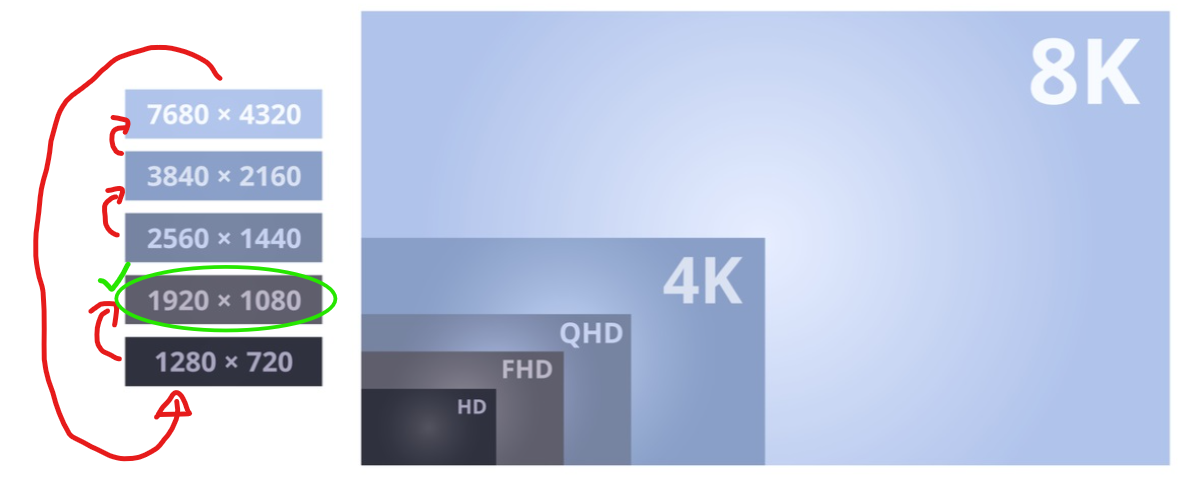 *Please note: The modes to cycle through and the maximum supported resolution vary by model of NVR and Monitor.
Was this article helpful?
That’s Great!
Thank you for your feedback
Sorry! We couldn't be helpful
Thank you for your feedback
Feedback sent
We appreciate your effort and will try to fix the article